Remove hot pixels from raw files
Hot pixels (sometimes called stuck pixels) appear as brightly coloured
spots in your images. They are often more noticeable with slow shutter speeds or high ISO settings.
Given the location of these hot pixels, Pixel Fixer can automatically remove them from the raw data
in one or more raw files. Dead pixels (pixels that always appear black) can also be removed by Pixel Fixer.
Extra criteria such as minimum pixel value, ISO or shutter speed can be specified for each hot pixel so that
Pixel Fixer will only try to map it out in certain conditions. You can also specify a range of dates or
shutter releases, so that the hot pixel will only be mapped out of photographs
that were taken within a given timeframe.
Note: Since the hot pixels
are only removed from the raw data it is necessary to create new JPEG/TIFF files from the corrected
raw file to get images that are free from hot pixels.
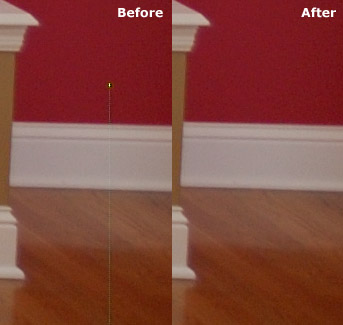
Remove hot strips from raw files
Some hot pixels cause a faint line that extends all the way to the edge of the
image. These can also be removed by Pixel Fixer, provided you indicate which hot pixel is associated with it.
Perform dark frame subtraction on raw files
To reduce noise in long exposures, some cameras can be set to automatically
record a second exposure (called a "dark frame") with the shutter closed and subtract it from the previous exposure. This method works well,
but consumes time and battery power. Using Pixel Fixer's Dark Frame Subtraction tool this process can
be now performed in software instead, using a lens-cap shot as the dark frame.
Perform flat-frame correction on raw files
This feature can be used to compensate for variations in brightness across the frame caused by vignetting or light falloff.
Combine image data from multiple raw files
The Blender tool can be used in "Lighten" mode to combine long exposures to create star trail images, or in "Median" or "Average" mode to combine images to reduce noise.
Extract embedded JPEGs
Many cameras produce raw files that have JPEG images embedded in them. Pixel Fixer can
extract these images and save them as seperate files with EXIF information included, so that you can get a quick
preview of what your raw files contain without having to shoot "Raw + JPEG" or process all the files with a raw converter.
Rename raw files
Pixel Fixer can rename your raw files (and the corresponding JPEG) while it's working, making it a useful part of your workflow.
Show number of shutter releases
Some DSLR cameras record the total number of shutter releases in each file. Pixel Fixer can extract this number from raw files.
Associate with folders and files
You can tell Pixel Fixer to associate itself with folders and raw files, for easy right-click access.
Multi-threaded processing
Pixel Fixer can use up to 8 threads (up to 32 threads in 64-bit version) to improve performance on multi-core/multi-processor systems.